Contact Us / REPORT A BUG

Use the form on the right to contact us.

Always looking forward to hearing from you! 


123 Street Avenue, City Town, 99999

(123) 555-6789

email@address.com


You can set your address, phone number, email and site description in the settings tab.
Link to read me page with more information.

IMG_0435.jpg

All The Things We Love About Speech Therapy With Adults

This blog is about all the things we at Sanapsis Love about Speech Therapy with Adults. 

How to make most out of Writing-category in Sanapsis

Nana Lehtinen

If I  would have to name a personal favorite category from Sanapsis, I think it would be Writing (or wait, maybe Comprehension. Hmm. Well for this post, I'm going to go with Writing, so there you go).

I truly get a kick of the way the category seems just a straightforward Copy letter > Copy word > Write a word in context > Write a sentence > Write a synopsis -approach to writing. But when you look closely, you see a world of possibilities.

Our Writing menu

Our Writing menu

Let’s get started with Copy Letters. First of all this is an awesome task to get going on writing with the non-dominant hand (like many of our right-handed patients need to after a stroke).

On screen, you see a letter on the left. On the right you see the same letter faded. Now, ask your patient to and draw the faded letter with their finger. When they get comfortable, add a stylus pen and voilá - sooner than you know you have them rocking the whole paper/pen thing (this on one of my patients rocking the K)!

But why is he writing in blue? Since we are also working on expressing opinions by choosing things, we started by him expressing the color he would like to write with and me adjusting the settings for him. And today, he felt like he wanted to use blue for this writing task.

Settings on Copy a letter by hand

There is a number of things in the settings. The colors are there mostly for patients who have visual constrains and need stronger feedback from their writing. But why not use them for adding to the task, just like us SLP:s know how to!

You can also choose the level of cueing and some other cool stuff, just tap the info-button to find out more!

Copy words using the keyboard

Moving on to working with the keyboard. In Copy words using the keyboard you: a) see a word, b) copy it using a keyboard.

And, as usual, there is more than meets the eye. In settings you can choose a category for the words. The words match exercises Naming nouns in Production and Word and picture in Reading. With these exercises you have the same vocabulary at your fingertips for naming, reading and writing! Awesome, right? And as you can see in this example, the vocabulary has everything we need, as recent research findings suggest.

Then it is time for my all time favorite in this category, Fill in the blank. Againpretty straightforward. You see sentence with a blank space, you ask your patient to fill that in. Now, please, please remember to take full advantage of the levels with this one!

Fill in the blank, level 1

Level 1 gives you a sentence with a noun missing. The sentence provides the context, thus a semantic clue for the word.

In this example the word would be: vacuum cleaner.


Fill in the blank, level 2

Level 2 challenges your patients to describe things, as the missing word is an adjective. Perfect for those patients who need lots of time for processing (they tend not to use too many adjectives in their output), and for patients who are generally were scarce in their output. This can also be very challenging for many higher level TBI patients, be sure to give it a try! 

Fill in the blank, level 3

And finally, level 3. This is where things get interesting with many patients I have worked with. The sentences on this level have vary little information, they function more as constraints than clues for the patient. Here the patient is challenged to create the meaningful context within the frame of the task. And let me tell you - we have had some fun with this one! Also, a great discussion starter on why it can be a difficult task to complete. 

Fill in the blank, level 3

I also encourage you to break away from the iPad with the tasks on Level 3. Give your patient paper and pen and ask them to fill in a couple of sentences on paper, just to write the whole sentence down. Then, have them expand one of the sentences to a little story (they already thought of an idea for the sentence, so why not take it a few steps further).

An example of this could be: Sentence: They did not have the song.  

Story: Alice and his boyfriend loved to sing karaoke. Alice wanted to surprise her boyfriend and had been rehearsing his favorite song, "Yellow submarine", for a week. On Friday night at the karaoke bar Alice got up to perform, but they did not have the song!

Fun? Yes! Even more if you take turns in coming up with the stories, so you get to give examples and ideas within a task!
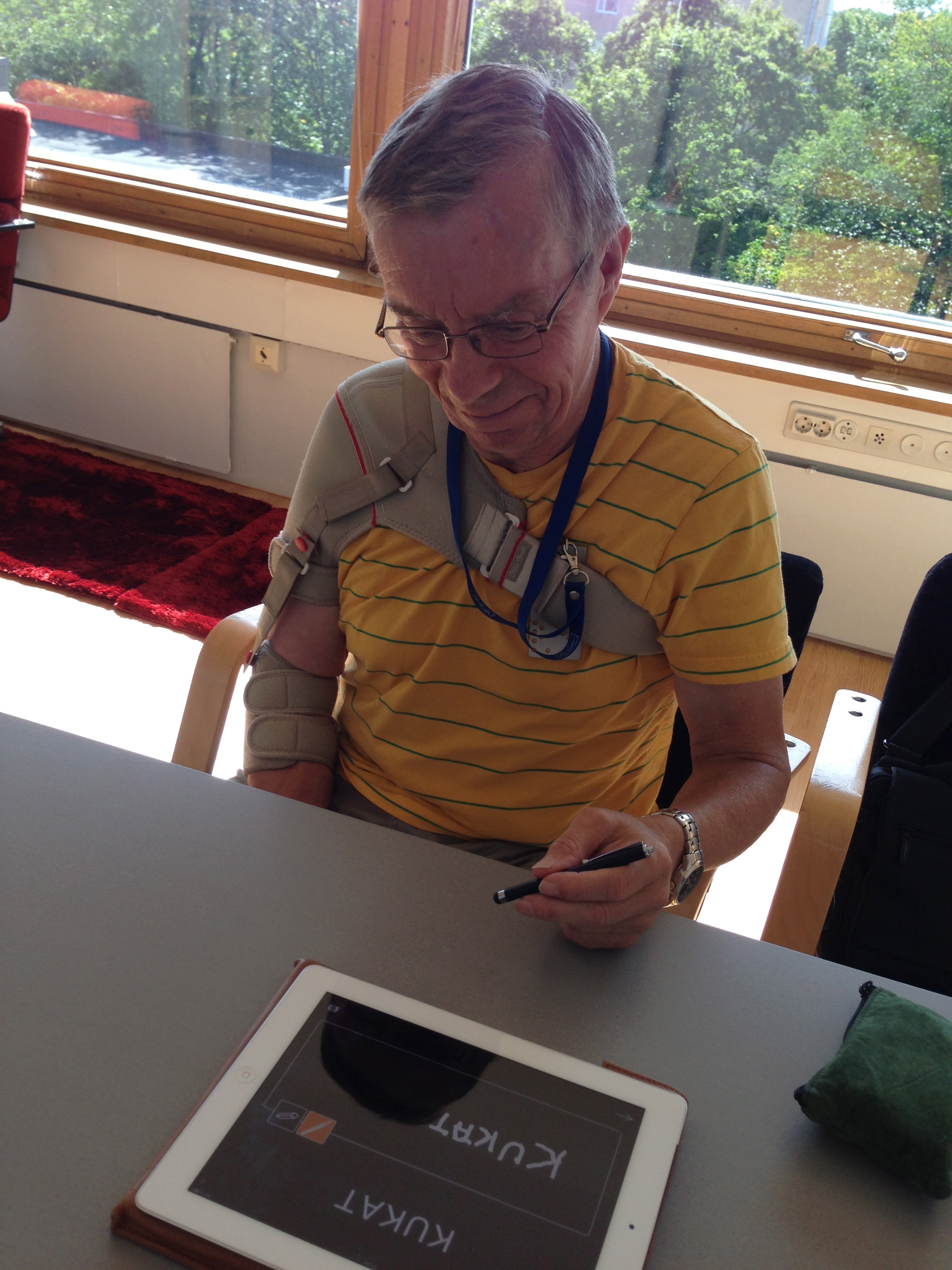
I still wanted to talk to you about Synopsis and how it has cool levels too and how you can change the background color from black to white to suit your patients needs. But I guess I have to leave something for you to discover on your own too!

So, I will leave you today with a picture of one of my patients rocking the word flowers in Finnish in Copy a word by hand.

Have fun and keep exploring! 

P.S. We are celebrating ASHA15 with a huge discount! You can have these exercises and way more on your iPad for $49,99!

Here we go, gems from Production category in Sanapsis.

Nana Lehtinen

First things first - Naming nouns and Naming actions. 

This is the basic flashcards-type naming task. In settings you choose a category, on screen you see a photo from that category (one of 369 photos in naming nouns or one of 197 photos in naming actions). You swipe to see the next photo.  It is simple, versatile and useful in many ways. 

But as you know, in the settings of this task you can choose how many images are shown on screen (1-4). When you have photo(s) on screen and you tap the one, it disappears. When you tap it again, it comes back. Why? Why does it disappear as the patient accidentally taps the pic? Annoying!! Must be fixed! Or..hmm..maybe surprisingly clever? 

I like to think it is surprisingly clever (as I designed it, hah). You can use this feature for delayed naming/repetition by asking your patient to name or repeat an item, hiding it and asking them to tell you what is hiding in that black screen. Use two or more to add memory challenge to the task. 

I sometimes get my patients to go the extra mile by asking them 1) to memorise the items on screen 2) to close their eyes (as I hide one of four images on screen) and 3) to tell me which one is missing. Instant fun! Using this in group settings or taking turns with your patient works well too. But be aware - if you are not paying attention, it can be more hard than you think to recall the missing item, especially after many repetitions. 

Next up: Create a sentence around words

Hope you remember this task has 2 levels… Level 1 provides two pictures with a connection, e.g yarn and a stuffed animal. This could lead your patient to make a sentence like: “I need yarn to fix my daughters stuffed animal”. Again a versatile task, often something to use after doing the same thing with physical objects from your patients home or your office (I like to warm my milk in the microwave before adding it to my coffee or The secretary needs keys to open the door). 

However, it is level 2 that makes things interesting. This level provides 3 images on screen. The instruction is to create a sentence around these three words. As you swipe through the tasks you learn that this task is quite challenging and needs a lot of deductive brainpower! For some of my patients I like to broaden the instruction and say “Create a little story (2-5 sentences) around these items”. This could result in “I took the bus to visit my sister on her birthday. When I got there I played Happy Birthday on her piano and gave her a CD of me playing the piano as a present.” 

If this is too easy, I ask them to create a DIFFERENT story around the same items. Now that requires flexibility, something most of our patients need a little work on. The next story could be something like: “As a bus driver I was once asked to deliver a present to someone in a small town. I agreed, but regretted after I learned the present was a piano!”


Give instructions


This one I already talked about in my previous post, scroll down to read more about the hidden treasure.


Ok, that was a brief reminder on what to expect when exploring Production category in Sanapsis. We always love to hear what our users come up with too, so please share your ideas with us! After all, the power of Sanapsis is that as the user you are free to be as creative as you can be, just with a little help from us.

Explore!

Nana Lehtinen

Are you a creature of habit?

I know I am! When I establish a nice routine it tends to stick and I easily forget to look for better or just different solutions, to explore my options. 

At work this often means using the same materials over and over again. And sometimes the new, refreshing idea to so close we forget it is there. If you use Sanapsis you probably have a few favourite things you use it for. For me, the top three look like this: 


Production - Create a sentence around words


Comprehension - Listen to a story


Semantics - Is this simile true


Favourites are favourites for a reason. For me, I believe the catch is that these exercises are super versatile and I can target loads of things within the task (just take a look at the instructions in each exercise and you find multiple variations for tasks and goals). 

But I should explore the app more often to refresh my ideas! Some of the exercises also have hidden gems when you look closely. A great example is Give instructions is Production category. In this task Level 1 has straightforward tasks for building a sequential, coherent story, like e.g. Explain how to boil potatoes. But level 2 has a fantastic twist - it provides similar tasks, but with problem solving! Here is an example: Paul left his wallet at home and needs to buy lunch at work. Tell him what to do.

And when I am only using my favourite ones, I forget about these gems - and that is just waisting potential. To encourage you to explore Sanapsis more often I am planning on writing a small series of posts on what our categories actually include in the coming posts. So stay tuned and never stop exploring!

Draw and write, it's good for you!

Nana Lehtinen

Browsing one of my favourite places on earth - the bookstore - generates yet another inspiring resource for therapy! 

Some time ago I came across two awesome books, 300 Drawing prompts and 300 Writing prompts. My initial thought was: These will be perfect for me! What an awesome way to be creative while waiting at the tax- or doctors office or listening to those awesome tunes you hear when you would just like to speak to a representative on the phone (we’ve all been there, right?). 

And oh my, it works! The books basically give you a prompt on what to draw or write in the space given. Like e.g. 300 Drawing prompts: Bull’s eye, Bouquet of roses or Something upside down. You would think it is not a big deal, but for a not drawer like me it is! 

We SLPs always encourage our patients to use pen and paper, to draw cues, hints and objects related to the idea when it is hard to find the right words. I often see myself being stuck to a few examples I feel comfortable with. How long has it been since I drew a Bonfire? And how hard was it at first to actually pick up a pencil and try to draw a bonfire? And now, because the book prompted me, I did!  And it made me feel awesome. Not a masterpiece, but a bonfire I was happy with. 

I tried this side by side with a patient and we had so much fun! We chose to show you our masterpieces of a Jackal and Deer antlers. Not bad, eh? 

These prompts are great for getting a patient feel comfortable with drawing and also using their non dominant hand for pencil-skills in general. Drawing together is a great way of being together too, so why not have the patient do this with the spouse or a friend? You draw one, I draw one is an easy way of being outside your comfort zone together - the place where all new adventures begin (like a new, enriched way of communicating with a loved one)!

300 Writing Prompts is another awesome find for our higher functioning adult patients. It is a nice, compact workbook to get your patient going with writing. The book prompts you with ideas and has limited space for writing on that topic (how awesome for working on planning ahead, staying on topic, forming meaningful entities with a beginning and an end). Some of the tasks are more complex e.g. Complete the thought: “I wish I had paid more attention when…”  and some are more straightforward, e.g. “Write about a time you broke something”. Great for homework and also to be used in therapy with a time constraint. I would also not pass the opportunity of using the book yourself, what a feeling when completing a writing task! 

I absolutely love these books for therapy and for myself. When I have some time to burn I find myself occasionally reaching for one of them instead of my phone and end up doing something creative and soothing instead of just spending 20 minutes lost on my phone.  And, maybe not so surprisingly, completing something creative makes you feel great. Who knew?

These books were Published by Piccadilly (USA) Inc. in 2015 and I found them at  Barnes & Noble